The best pathology labs in India operate dozens of analysers everyday. Each one produces results. Someone reads those results off a screen and types them into your reporting system. That manual step costs time and introduces errors. A single transposed digit on a critical value can change a diagnosis.
Machine interfacing removes that step. It creates a direct connection between your diagnostic instruments and your software. Results flow automatically without a single keystroke. For a busy pathology lab, that connection changes how the entire operation runs.
Let me walk you through what it actually does and why bi-directional integration matters more than most people realise.
What Is Machine Interfacing Lab Software?
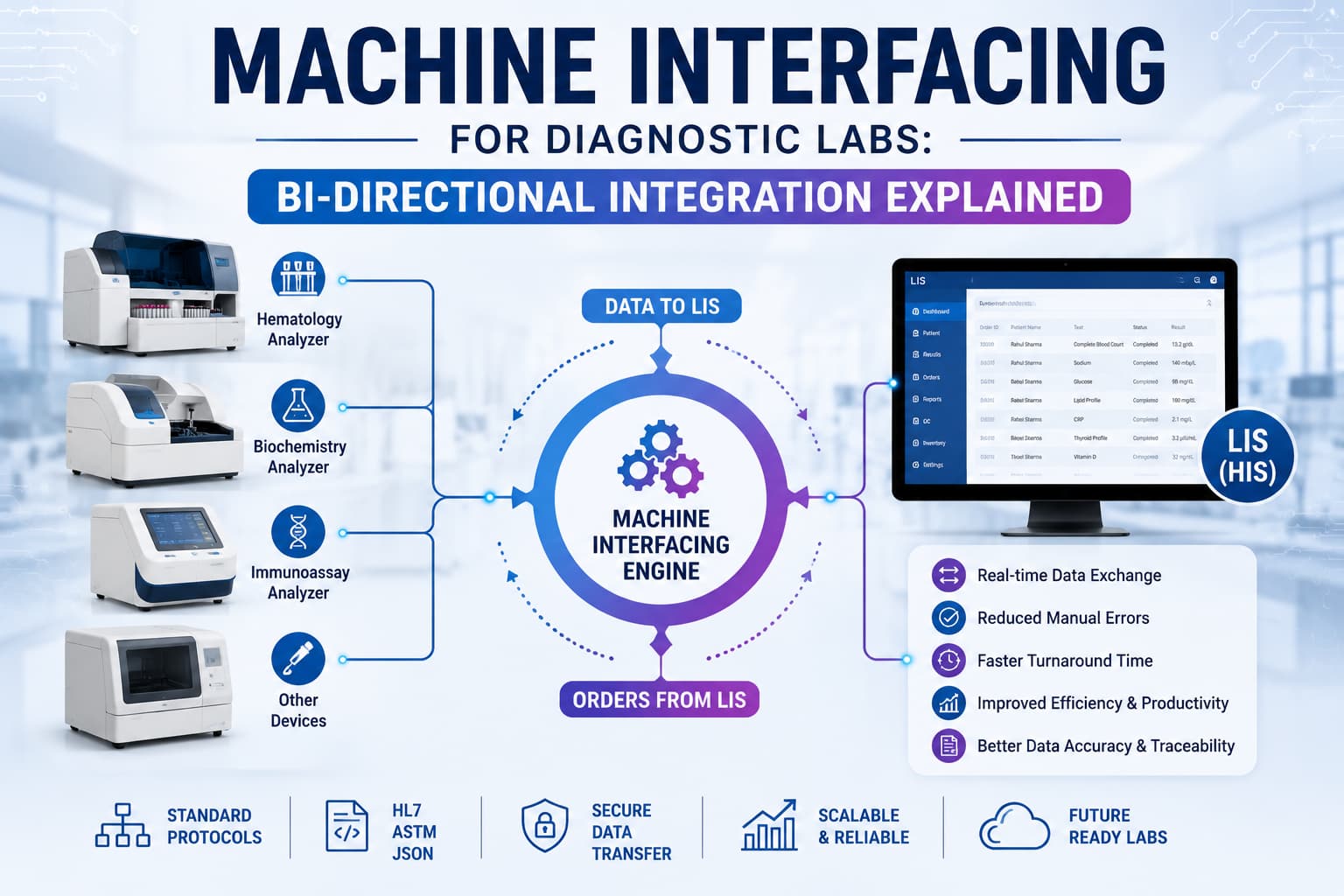
Machine interfacing lab software connects your diagnostic analysers to your Laboratory Information System (LIS) so test data moves between them without manual entry. When a machine completes an analysis, results travel straight into the digital record tied to the right patient and sample.
There are two ways this connection works: uni-directional and bi-directional.
A uni-directional setup sends data one way. The analyser finishes a test and pushes the result into the LIS. The machine talks, the software listens.
Bi-directional integration goes both ways. The LIS sends test orders to the analyser, and the analyser sends results back. Your software tells the machine what to run based on the sample barcode. The machine runs it, then returns the values. No one keys in an order. No one retypes a result.
This two-way conversation is what people mean by bi-directional LIS integration. It changes how a lab runs day to day.
Why Manual Entry Hurts Your Lab
Hand-typing results feels harmless when volumes are low. At scale, the cracks show.
Transcription errors creep in. A potassium value of 4.5 becomes 5.4. A decimal shifts. These mistakes are hard to catch because the number looks plausible. Staff also burn hours doing data entry instead of actual lab work. And every manual step adds delay between sample and report.
Lab analyser integration removes the human keyboard from the equation. The data arrives exactly as the machine measured it. Speed improves, errors drop, and your team focuses on diagnostics rather than data entry.
*Centers that run radiology should also explore RIS integration for accurate imaging results.
How Does Bi-directional Integration Work?
- A sample arrives and gets registered with a barcode.
- The analyser scans the barcode and asks the LIS what tests to run.
- The LIS sends the order list back to the machine.
- The analyser runs the tests and returns results to the software.
- Results land in the patient record, ready for review and approval.
The barcode is the thread tying it all together. Because the machine pulls instructions from the software, there's no risk of running the wrong panel or mislabeling output. The system knows which sample belongs to which patient before a single test starts.
Uni-Directional vs Bi-Directional Integration
| Feature | Uni-directional | Bi-directional |
|---|---|---|
| Data flow | Machine to software only | Software to machine and back |
| Test order entry | Manual into the analyser | Automatic from the LIS |
| Error risk | Lower than manual, some order errors remain | Lowest, orders and results both automated |
| Best for | Smaller labs, single-test machines | High-volume labs, multi-test analysers |
| Setup complexity | Simpler | Needs analyser support for two-way communication |
| Result speed | Fast | Fastest |
Not every analyser supports two-way communication, so some labs run a mix. A modern LIS should handle both without forcing you to standardize on one approach.
What to Look for in B2B Lab Software
When you evaluate B2B lab software for interfacing, a few things separate strong platforms from weak ones.
Start with brand coverage. Your lab probably runs analysers from different manufacturers. Your lab probably runs analyzers from different manufacturers. Before you commit, match a vendor's supported brands against your own lab equipment list to confirm full coverage.
The software needs to speak to all of them, not just a favored few. Ask directly which machine brands a vendor supports before you commit.
Look at protocol flexibility too. Analysers communicate through standards like HL7 and ASTM, plus proprietary formats. Good software adapts to the machine rather than asking you to replace working equipment.
Then check what happens after the data arrives. The best pathology lab software pairs interfacing with quality control, smart flagging of abnormal values, and clean report generation. Integration that dumps numbers into a database without these layers leaves most of the value on the table.
Finally, think about access. Online pathology lab software lets your pathologists review and approve results from anywhere.
Common Worries
Will it work with my old analysers?
Usually yes. Age matters less than communication capability. Many older machines still support standard protocols. A capable interfacing layer connects to equipment that's been running for years.
What if the connection drops mid-run?
Reliable machine interfacing lab software queues data and reconciles it once the link restores. Results don't vanish. They wait and sync.
Is the setup disruptive?
The initial configuration takes planning, but a good vendor handles the heavy lifting. Once connected, the system runs quietly in the background.
"Can I trust the numbers?" That's the point. Removing manual entry makes the data more trustworthy, not less. The values in your LIS match what the machine measured, every time.
The Payoff for Your Lab
Fewer errors: Direct data transfer removes transcription mistakes entirely.
Faster turnaround: Results move in seconds, shrinking the gap between sample and signed report.
Lighter staff load: Your team stops retyping and starts focusing on analysis.
Better traceability: Every result links to a barcode, sample, and patient automatically.
Cleaner audits: Automated records simplify compliance and quality reviews.
Bringing It Together with Flabs
Flabs supports effortless integration with all major machine brands, offering both uni and bi-directional interfacing.
That includes AGAPPE, Beckman Coulter, Roche, Abbott, Leica, Siemens Healthineers, Thermo Fisher Scientific, Transasia, Accurex, Bio-Rad, Mindray, Horiba, DiaLab, and Agilent Technologies.
Once results flow in from your analysers, the platform does more than store them. Trusted by 2000+ NABL labs, Flabs layers AI on top of your data.
- AI Interpretation and AI Flagger surface abnormal values so nothing slips past review.
- AI Smart Report turns raw results into polished, structured reports.
- Quality Control runs automated checks before any report goes out.
- TAT Management tracks every test in real time for on-schedule delivery.
- Dynamic QR codes and barcodes keep reports traceable and tamper-proof.
The result is a single connected system. Your machines feed clean data in, and your pathologists send accurate reports out, with AI handling the heavy lifting in between.
The Bottom Line
Machine interfacing is no longer a luxury for large reference labs. It's how any serious diagnostic lab keeps errors down and speed up. Uni-directional connections solve the basics. Bi-directional integration goes further, automating both orders and results for labs that run high volumes.
The technology has matured. The question now isn't whether to connect your analysers, but how soon. Your patients depend on results that are fast, accurate, and traceable. Direct machine interfacing delivers all three.
A platform like Flabs ties it into one system your whole lab can rely on.
Alsp check - Semi-Auto vs Fully Automatic Biochemistry Analyser: Which Should You Buy?
Get Started at ₹1!
Try Flabs for a full month for just ₹1.
Follow us on