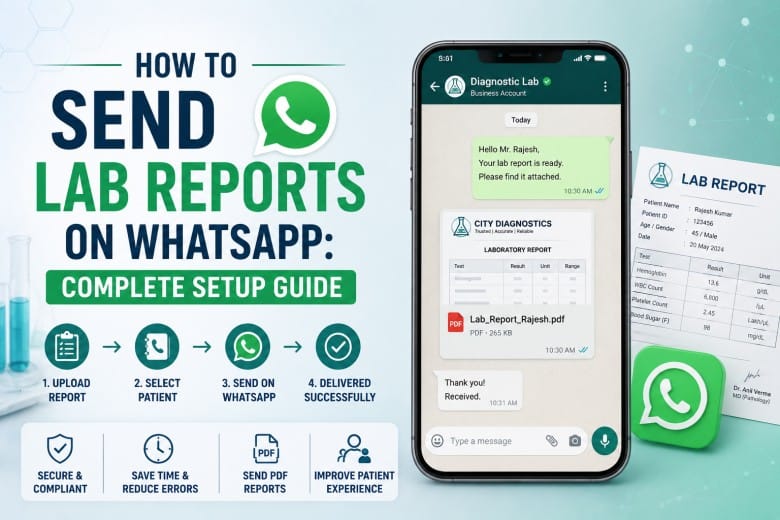
Patients today expect their lab reports the same way they expect everything else. They should get reports fast on their phone with no follow-up calls needed. WhatsApp with over 500 million active users in India alone has become the default channel for report delivery across diagnostic labs, pathology centres, and hospital labs.
If your lab is still printing pathology reports or emailing PDFs that patients never open, you're already behind. This setup guide walks you through exactly how to get WhatsApp lab reports running at your lab.
How to Send WhatsApp Lab Reports
Think about the old flow: print reports, call patients, wait for pickup, or send emails that go unread. Now compare that with a WhatsApp message that lands instantly on a patient's phone.
- Reports reach patients within seconds of approval.
- No repeat visits to collect a printout.
- Staff spend less time on manual sharing and follow-up calls.
- Patients can take the next immediate steps.
- Everything stays encrypted when done through official API-based systems.
You have four practical methods to get there. Which one fits your lab depends on your daily volume and existing setup.
4 Methods to Send Lab Reports on WhatsApp
While each method works, they are not interchangeable. Your daily report volume, existing software stack, and staff will point you toward the right one. Walk through each option below and pick what fits your lab's reality.
1. Automated Integration via Google Sheets or LIS Triggers
This is the most efficient starting point for labs that don't yet use a full LIS.
You connect your lab data source, e.g., Google Sheets or basic lab software, to a WhatsApp API platform. The moment a report status changes to "Completed," the system fires a message automatically.
- Patient data is stored in a sheet or database.
- Report uploaded as a PDF or secure link.
- Status updated to "Completed".
- WhatsApp message sent instantly with the report link.
2. Lab Information System (LIS) with Built-In WhatsApp
If your lab already uses LIS software, this is the cleanest approach. WhatsApp reporting integrates directly into your dashboard.
- Send reports directly from your LIS interface.
- Centralised patient data and delivery logs.
- Faster processing for staff handling high volumes.
3. WhatsApp Business APIs
For scale, this is where most diagnostic labs land. Platforms like AiSensy give you structured, template-based messaging with full automation.
- Pre-approved message templates (required by Meta).
- Secure report links with access control.
- Interactive buttons like "View Report" or "Book Follow-up".
- Bulk messaging with per-patient personalisation.
It's structured, audit-ready, and scales from 100 to 10,000 reports a day without extra headcount.
4. WhatsApp Broadcasts (Limited Use Only)
Broadcast lists can push updates to multiple contacts. But they're not the right channel for individual lab reports. Use broadcasts for health campaigns, new service announcements, or preventive check-up reminders. For actual WhatsApp lab reports, always use API-based delivery with patient-specific triggers.
Automate WhatsApp Lab Reports: Step-by-Step Setup
Setting this up once means your lab runs report delivery on autopilot from that point forward. The steps below follow a logical sequence. Skip one and the automation breaks down. Work through them in order.
Step 1: Organise your patient data
Maintain a database with name, phone number, test details, and report status. Google Sheets works for smaller setups. LIS software handles this natively at scale.
Step 2: Generate and store reports securely
Once reports are ready, convert them to PDF, upload to a secure server or cloud, and generate a shareable link with access control. Never share a publicly indexable link. Restrict access to the individual patient.
Step 3: Connect to a WhatsApp API platform
Use a BSP platform or your LIS's built-in WhatsApp integration to sync your database, create automated triggers, and configure your message templates.
Step 4: Create and Submit Message Templates
WhatsApp requires pre-approved templates for all outbound messages. A standard template for WhatsApp lab reports looks like:
"Hi [Name], your [Test Name] report from [Lab Name] is ready. Download it here: [Link]. For queries, call [Number]."
You can add interactive buttons to make it more actionable, e.g., "Download Report" or "Book Consultation". Template approval usually takes 24-48 hours.
Step 5: Set your automation trigger
Configure the condition: when report status = "Approved" → send WhatsApp message automatically. No human intervention after setup. Reports approved at 11 PM reach patients immediately.
Step 6: Test before going live
Send test reports to internal numbers first. Confirm the PDF opens on both Android and iOS, the patient name pulls correctly, the message fires within 2 minutes of approval, and the link is secure.
What Patients Actually Expect
It is worth knowing what patients expect when a lab contacts them on WhatsApp. Actually, even before you set up the process. After all, patients treat it like a digital front desk. Their bar is higher than you might think.
Speed: An instant automated reply, even just a "your report is being processed" message, reassures patients their request is acknowledged. Silence reads as inefficiency.
Plain language: No medical jargon in the notification. The report has the clinical details. The WhatsApp message should tell patients what to do next, in plain terms.
Consistent updates: Patients don't want to call in and ask. They expect a steady flow, i.e., registration confirmation, sample received, report ready. Each touchpoint reduces anxiety and front desk call volume.
A Human Tone: A message that reads like it came from a person, not a bulk system, builds more trust. Keep templates warm and direct, not clinical and cold.
No friction: The download should work in one tap. If a patient has to log in, find a portal, or call to get their report. Your delivery has already failed, regardless of how fast the message arrived.
WhatsApp Business App vs. API
| Aspect | WhatsApp Business App | WhatsApp Business API |
|---|---|---|
| Best for | Small clinics, under 50 reports/day | Labs with 100+ daily reports |
| Access | Single device | Multi-user, multi-device |
| Automation | Manual only | Full trigger-based automation |
| Bulk sending | Not supported | Supported with templates |
| Audit trail | None | Full delivery logs |
| Cost | Free | Platform fees apply |
If you're crossing 50 reports a day, the Business App becomes a bottleneck fast. The API is the right foundation for any lab that plans to grow.
What are the Major Benefits?
- Patients receive reports instantly on WhatsApp, cutting out wait times and follow-up calls completely.
- Automated reminders can lower missed appointments by 30-40%, with quick options to confirm, cancel, or reschedule.
- AI chatbots respond 24/7, handling queries about timings, services, and bookings without staff involvement.
- Patients can book, receive confirmations, and get reminders within the same chat thread, reducing friction.
- End-to-end encryption, password-protected reports, and controlled access keep patient information safe.
- Faster response rates compared to SMS or email improve communication and keep patients actively connected.
- Cuts expenses on SMS, printing, and manual staff effort, improving overall efficiency.
- Easily handles growing patient volume, multiple staff users, and expansion across locations without disruption.
A Note on Best Practices
Multiple mobile numbers per patient: Patients in India regularly change SIM cards or use two numbers. Collect and verify the WhatsApp-active number at registration, not just any mobile number on file.
Regional language preferences: Some patients in tier-2 and tier-3 markets prefer message text in Hindi or their regional language. If your LIS supports multilingual templates, set this up for the notification message. The clinical report itself stays in English for NABL compliance.
Network delivery in low-connectivity zones: In areas with patchy connectivity, WhatsApp messages queue and deliver the moment the patient comes back online. So it is more reliable than SMS for rural or semi-urban patients.
Data privacy: Your WhatsApp integration for pathology labs in India must route through encrypted, API-authorised channels. Never use personal WhatsApp accounts for patient report delivery.
Patient consent: Get explicit opt-in before messaging. Explain what messages they'll receive and give them a clear opt-out option.
24/7 delivery without extra staff: Automated WhatsApp lab reports don't clock out. Set clear expectations in your message template about query response hours.
How Flabs LIS Handles It
Flabs is an AI-powered LIS trusted by 2000+ NABL labs across India, with WhatsApp report sharing built directly into the platform. Approve and dispatch 100+ reports in a single bulk action with automated QC checks running before any message fires. So nothing reaches a patient without clearing your quality gate first.
Every report carries a dynamic QR code for tamper-proof verification, barcode-linked sample tracking, and embedded clinical interpretations so patients and referring doctors get context alongside their results.
For labs processing high daily volumes, Flabs tracks every test in real time and ensures on-schedule WhatsApp lab report delivery at any hour.
Common Mistakes
Sending from a personal number: Violates Meta's terms and exposes patient data. Don't do it, even temporarily.
Skipping template approval: Messages sent without pre-approved templates get blocked at the API level before they reach any patient.
PDF file size over 5MB: Large files fail on poor mobile connections. Compress reports if needed.
Not testing on both Android and iOS: PDFs render differently across platforms. Always test on both before going live.
No delivery log: Know which reports were delivered, when, and to which number. If a patient claims they didn't receive a report, you need proof.
Final Thoughts
If you're running a NABL lab or high-volume diagnostic centre and want WhatsApp report delivery that runs without manual intervention, Flabs LIS gives you everything in one platform, viz., bulk sharing, dynamic QR codes, automated QC, real-time tracking, and full audit trails.
Start a 5-day free trial of Flabs and see exactly how WhatsApp lab reports work inside the platform, with your lab's actual data.
Flabs LIS is an AI-Powered Lab Software Trusted by 2000+ NABL Labs across India.
Also check- How to find the Right Location for Your Diagnostic Lab and Lab Business Plan Template
Get Started at ₹1!
Try Flabs for a full month for just ₹1.
Follow us on